


Messages SMS Text Home
3.917.00 Reviews
App Specs
- Version
- 1.1.2
- Updated On
- License
- Free
- Downloads
- 100,000+
- Developer
- Metamorph AI Labs
- Categories
- Communication
- Platform
- Android
Screenshots

 Analysis by AppCompare
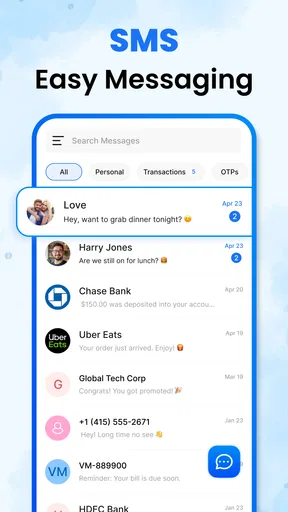
Choosing an SMS app is less about finding the longest feature list and more about deciding what you want to improve. I usually start with a practical question: do I need a different way to handle ordinary text conversations, or am I looking for a secure, cross-platform service with a broader set of communication tools? Messages SMS Text Home is aimed at the first kind of need. It is a free communication app from Metamorph AI Labs, and its central appeal is a home screen built around viewing and managing SMS without turning the experience into a complicated project.
That focus makes it easier to judge what you are getting. If the default messaging experience on your phone feels cluttered or awkward, a straightforward SMS app may be worth trying. If you expect a new service that replaces every chat platform you use, this is a different proposition: SMS remains the center of the experience, so it is best considered as a way to manage text messages rather than a universal messaging network.
Start with the job you need the app to do
Before switching, I would think about how often I use SMS and what bothers me about my current setup. Someone who mainly texts family, delivery drivers, school contacts, or local businesses may value a clear place to reach conversations more than a stack of advanced tools. A reader who relies on group chats, internet-based messaging, or elaborate organization may have different priorities and should compare those needs carefully.
The app is listed as suitable for everyone, and its straightforward purpose should make it approachable for people who do not want to learn a new communication system. Its average rating is 4.2 from around 130 ratings, with 50K+ installs. Those figures offer a little context about its audience, but they cannot tell you whether its exact layout will suit your habits; the best test is whether you can find and manage the threads you actually use.
One useful way to evaluate it is to try a few real tasks rather than judging the home screen alone. Open an existing conversation, locate an older message, and check whether the everyday flow feels natural. Then consider what you expect from notifications and contact handling. These small checks reveal more than a quick glance at appearance, because an SMS app earns its place through the routine actions you repeat.
Simple Setup and Intuitive Interface
Getting started with Messages SMS Text Home is as straightforward as it gets. The installation process is quick, and before you know it, you’re ready to start exploring. The app welcomes you with an intuitive interface that feels both familiar and fresh. It’s like coming home after a long day—everything is right where you expect it to be.
The layout is clean, minimizing distractions and focusing on what truly matters: your conversations. This simplicity doesn’t just make the app easy to use; it also ensures that even the most tech-averse among us can navigate with ease.
Worth Reading Before You Choose

EA SPORTS FC Mobile 26 Is a Bigger Football Game, but It Takes Time

Flipboard Shows What News Apps Must Do Beyond the Feed

Switching to Android Auto Means Rethinking Your Driving Routine

Google Calendar Makes a Crowded Week Easier to Manage

Ludo King Makes the Most of the Minutes Between Plans

Baby Panda World Brings Quick Play to Modern Phones, but Its Game Library Feels Busy
Where a focused SMS home screen can help
The strongest case for a dedicated SMS interface is the steady stream of practical messages that can get lost among other phone activity. Imagine getting home after errands and wanting to find a pickup confirmation, a message from a neighbor, and a family member’s address. A conversation-centered starting point can make that check-in feel more direct than searching through unrelated apps or scrolling through notifications.
Search is particularly useful when you remember a detail but not when it arrived. Instead of paging through a long thread, you can look for a word or phrase and use the result to return to the relevant exchange. A small habit makes this more effective: search for a distinctive name, place, or item rather than a common word. That reduces the chance of wading through unrelated matches and is a better use of the feature than treating it as a general archive.
For people who receive routine SMS reminders, the app can also serve as a practical inbox to check at set moments—before leaving home, after work, or when expecting a time-sensitive reply. That is not a dramatic change in how texting works, but it can help if your current interface makes messages feel scattered. I would still keep important information somewhere more reliable than a conversation thread when losing it would cause a real problem.
Customization Galore
Now, let’s talk customization. One of the standout features of this app is its ability to let you personalize your messaging experience. Want to change the look of your chat bubbles? You got it. Prefer a different background color or image? No problem. It gives you the freedom to tweak the aesthetics to match your style.
And it’s not just about looks. You can customize notifications, choose from different themes, and even set up unique ringtones for different contacts. It’s these little touches that make the app feel truly yours.
Those options are most useful when they solve a real recognition problem. For example, a distinct alert for a close contact can help you notice a message without repeatedly checking the phone, while a quieter setting for less urgent conversations may cut down on interruptions. I would make one change at a time and live with it for a day or two; changing every color and alert at once makes it harder to tell which adjustment actually helped.
There is a trade-off to personalizing a communication app: a theme that looks attractive at first can make text harder to read in bright light or at a glance. I would prioritize legibility over decoration, especially if I often read messages while moving between tasks. A visual tweak should make the inbox easier to use, not turn a simple conversation into something I have to decipher.
Everyday compatibility and messaging expectations
Beyond aesthetics, the app shines in how it integrates with your device. It syncs seamlessly with your existing contacts, making sure you’re always up to date. The app is also optimized for both Android and iOS, ensuring that whatever device you’re rocking, you’re in for a smooth experience.
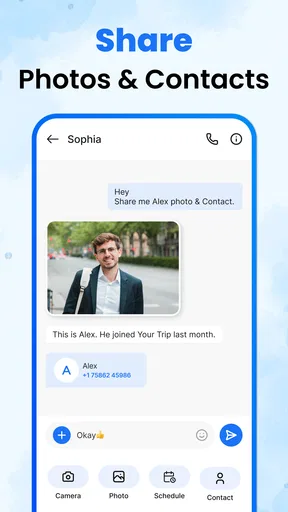
The developers have packed in a few nifty features too. There’s a search function that lets you find old messages without the hassle of endless scrolling. Plus, the app supports multimedia messages, so you can send photos, videos, and even voice notes with ease.
When deciding between an SMS-focused app and a typical internet-based chat service, I would look at who is on the other end. SMS is useful when the conversation needs to work through ordinary phone messaging, while a separate chat service may be a better fit when your regular contacts already use it for richer group conversations and shared media. These are different categories with different habits, not interchangeable skins for the same system.
Multimedia support is handy for a quick photo or voice note, but I would not assume that every recipient, device, or message situation behaves identically. For an important image or a long recording, check that it has actually gone through before relying on it. The sensible workflow is to use the app for convenient everyday exchanges and switch to another method when a file or conversation needs capabilities beyond ordinary SMS-style messaging.
One practical question for a potential switch is whether installing it changes how messages are handled on your particular device. Before making it your everyday choice, review the prompts shown during setup and confirm what role the app is asking to take. That is a useful checkpoint with any messaging replacement: it helps avoid surprises and lets you decide whether you are comfortable with the setup before making the change habitual.
Privacy claims deserve careful checking
In a world where privacy is paramount, it is important to understand exactly what protections an app offers before trusting it with sensitive conversations. Claims about encryption, app locks, or biometric access can sound reassuring, but I would not treat a privacy feature as established unless it is clearly presented in the app itself and its settings. For sensitive details, check the available security controls directly and consider whether SMS is the right channel in the first place.
Additionally, you have the option to lock the app with a password or fingerprint ID, adding an extra layer of protection. It’s these thoughtful touches that make you feel secure, knowing your data is safe.
A device lock and a messaging app’s own protections serve different purposes, so I would avoid assuming that one feature covers every privacy concern. If you share a phone, think about what appears in notifications as well as what someone might see after opening the app. Adjusting alerts to reveal less message content can be a more useful everyday precaution than relying only on a lock screen.
Performance, cost, and the decision to switch
When it comes to performance, the app runs like a dream. Messages load quickly, and sending texts is instantaneous. There’s no lag, no freezing—just smooth sailing all the way. The app is lightweight, so it doesn’t hog your device’s resources, which is always a bonus.
Users have been raving about the user-friendly experience, and it’s easy to see why. Whether you’re a texting newbie or a seasoned pro, the app caters to all, making communication effortless and enjoyable.
The current version is 1.0.1, and the stated minimum operating-system requirement is 10. I would check that requirement against the device I plan to use before spending time setting up a replacement. That is especially worth doing if I am choosing an older phone for a relative: a clean interface cannot help if the device does not meet the compatibility requirement.
The app is free to install, with in-app purchases listed at $5.99–$29.99 per item. That does not mean you need to buy anything to decide whether its basic approach suits you; I would first use the no-cost experience for the ordinary tasks I care about. If an optional purchase appears, check what it offers and whether it solves a specific need before paying. A one-time visual preference is not automatically worth spending on if the default setup already works.
Switching also has a modest but real attention cost. You may need to get used to a new layout, revisit notification preferences, and confirm that conversations and contacts appear as expected. I would make the change at a quiet time rather than just before an appointment or a day when I am waiting for an important message. Keep the old routine in mind until you have confirmed that the new one handles your normal conversations comfortably.
Who should choose it—and who should keep looking
I would recommend trying this app if your main goal is to make everyday SMS easier to view and manage, and you appreciate a home screen that keeps attention on conversations. Its combination of a focused purpose, contact integration, search, media messaging, and appearance controls gives practical users a few ways to shape the experience without requiring them to adopt a separate social network.
I would look elsewhere if your priority is a feature-rich online messenger, a particular group-chat ecosystem, or a privacy setup that you have not been able to verify for yourself. Someone who is fully satisfied with the phone’s current messaging app may also have little reason to move; switching for its own sake adds setup work without necessarily improving a routine that already feels smooth.
For a household member who finds a busy phone confusing, the useful test is not whether the app offers many settings but whether the person can open it, spot the right conversation, and respond without help. For a heavy texter, the test is different: search and notification controls should make large volumes easier to manage, not add another layer of maintenance. In both cases, a short trial with real conversations is more revealing than changing every available setting on day one.
Conclusion: A Messaging Marvel
So, is it worth your time? Absolutely. It’s a well-rounded app that combines simplicity with powerful features, all while prioritizing user experience and security. Whether you’re looking to jazz up your texts with a little personalization or simply want a reliable messaging app, this one’s got you covered.
Ready to give it a try? Head over to the Play Store or App Store, and bring a little more joy to your texting routine. Who knew messaging could be this fun?
Pros
- User-friendly interface
- easy navigation.
- Supports multimedia messages seamlessly.
- Customizable themes and fonts.
- Quick reply from notification bar.
- Low data usage for sending texts.
Cons
- Limited advanced messaging features.
- Occasional ads can be intrusive.
- No built-in encryption for texts.
- Lacks integration with other apps.
- Limited support for international numbers.
FAQs for Messages SMS Text Home
What features does Messages SMS Text Home offer?
Messages SMS Text Home provides a comprehensive messaging experience with features such as customizable themes, group chats, emoji support, and multimedia messaging. The app also includes advanced security options, like end-to-end encryption, ensuring your conversations remain private. Additionally, it offers a user-friendly interface for easy navigation.
Is Messages SMS Text Home free to use?
Yes, Messages SMS Text Home is free to download and use. However, it may offer in-app purchases or premium features that enhance the messaging experience. These additional features could include advanced customization options, ad removal, or extra security settings. The basic functionalities remain accessible without any cost.
How secure is Messages SMS Text Home?
Messages SMS Text Home prioritizes user privacy with robust security measures such as end-to-end encryption. This ensures that only you and the person you’re communicating with can read the messages. The app also includes optional security features like PIN protection and biometric login to further safeguard your data.
Can Messages SMS Text Home be used offline?
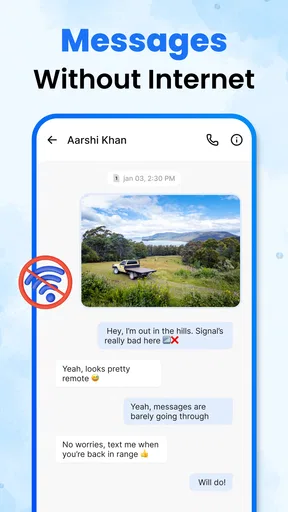
Messages SMS Text Home requires an internet connection for sending and receiving messages, especially multimedia content. However, you can draft messages offline and they will be sent once a connection is re-established. Offline functionality is limited to message drafting and viewing previously downloaded conversations.
Does Messages SMS Text Home support multimedia messaging?
Yes, the app fully supports multimedia messaging, allowing users to send and receive images, videos, and voice notes seamlessly. This feature enhances communication by enabling users to share rich content easily. The app's interface is designed to handle multimedia efficiently without compromising performance.


